mirror of
https://github.com/lensapp/lens.git
synced 2025-05-20 05:10:56 +00:00
 ba063417e0
Resolved conflicts in Your First Extension after rebasing from master

Reworked extensions/README.md

Signed-off-by: Paul Williams <pawilliams@mirantis.com>

Reworked the content in your-first-extension.md

Signed-off-by: Paul Williams <pawilliams@mirantis.com>

Reworked beginning of extension-anatomy.md

Signed-off-by: Paul Williams <pawilliams@mirantis.com>

Reworked the writing in extensions/get-started/anatomy.md

Signed-off-by: Paul Williams <pawilliams@mirantis.com>

Reworked beginning of wrapping-up.md

Signed-off-by: Paul Williams <pawilliams@mirantis.com>

Squashed 3 commits

Reworked writing in wrapping-up.md

Signed-off-by: Paul Williams <pawilliams@mirantis.com>

Reworked content throughout Extension Development > Getting Started and squashed commits

Removed extensions/capabilities/README.md and extensions/testing-and-publishing/bundling.md from mkdocs.yml nav

Signed-off-by: Paul Williams <pawilliams@mirantis.com>

Added extensions/get-started/overview.md to mkdocs.yml nav, reworked writing in extensions/get-started/wrapping-up.md and extensions/get-started/overview.md, changed links that pointed to extensions/capabilities/overview.md to go to extensions/capabilities/common-capabilities.md instead

Signed-off-by: Paul Williams <pawilliams@mirantis.com>

Changed all titles throughout docs, including in body, to title case

Signed-off-by: Paul Williams <pawilliams@mirantis.com>

Reworked bullets in extensions/get-started/anatomy.md

Signed-off-by: Paul Williams <pawilliams@mirantis.com>

Intergrated Windows instructions into your-first-extension.md, made minor edits throughout extensions/get-started and fixed a couple titles in mkdocs.yml nav

Signed-off-by: Paul Williams <pawilliams@mirantis.com>

Changed Extension Development > Get Started to Getting Started in mkdocs.yml

Signed-off-by: Paul Williams <pawilliams@mirantis.com>
1001 B
1001 B
Adding Clusters
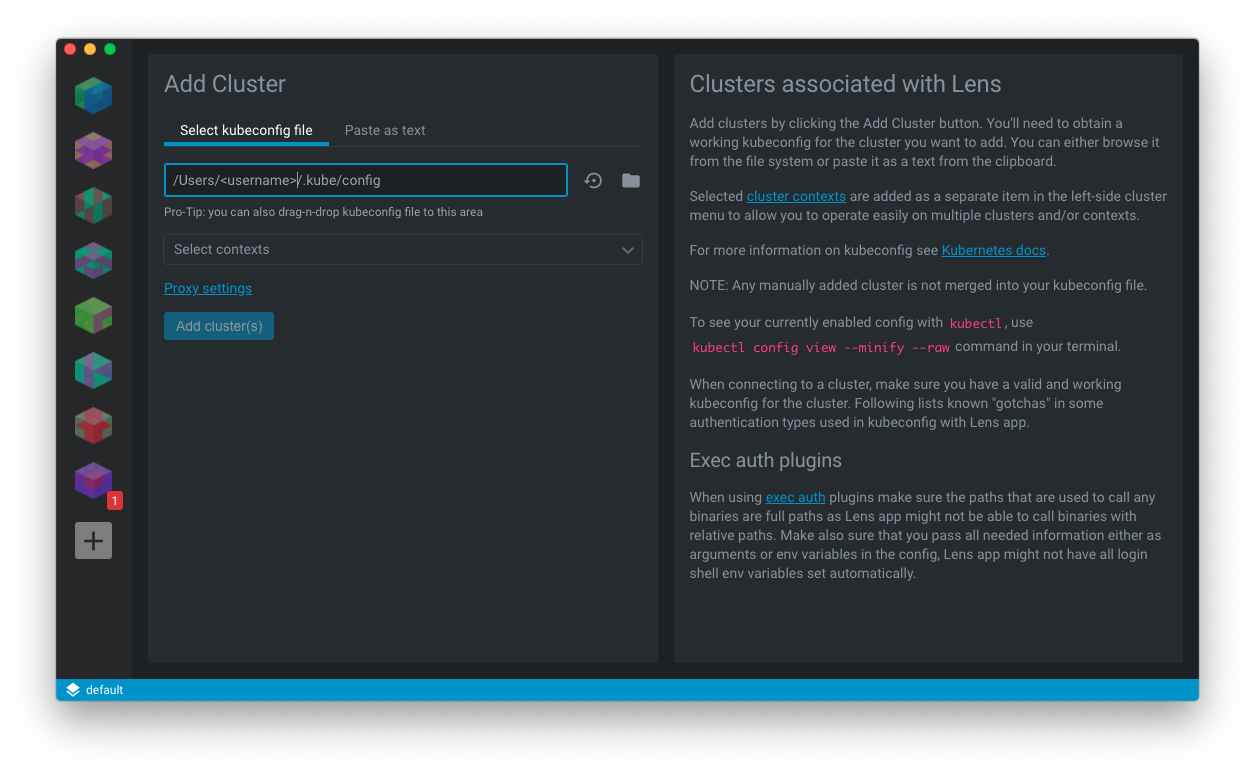
Add clusters by clicking the Add Cluster button in the left-side menu.
- Click the Add Cluster button (indicated with a '+' icon).
- Enter the path to your kubeconfig file. You'll need to have a kubeconfig file for the cluster you want to add. You can either browse for the path from the file system or or enter it directly.
Selected cluster contexts are added as a separate item in the left-side cluster menu to allow you to operate easily on multiple clusters and/or contexts.
NOTE: Any cluster that you added manually will not be merged into your kubeconfig file.
For more information on kubeconfig see Kubernetes docs.
To see your currently-enabled config with kubectl, enter kubectl config view --minify --raw in your terminal.