 e7ee7fe2b0
- remove handlers when an extension is deactivated or removed

- make sure that the found extension when routing a request is currently
  enabled (as a backup)

- added documentation about the above behaviour to the guide

- tweaked the naming convension so that it is clearer that the router
  uses extension names as not IDs (which currently are folder paths)

Signed-off-by: Sebastian Malton <sebastian@malton.name>
2.4 KiB
Lens Protocol Handlers
Lens has a file association with the lens:// protocol.
This means that Lens can be opened by external programs by providing a link that has lens as its protocol.
Lens provides a routing mechanism that extensions can use to register custom handlers.
Registering A Protocol Handler
The method onProtocolRequest exists both on LensMainExtension and on LensRendererExtension.
This is how, as an extension developer, you can register handlers for your extension.
The pathSchema argument must comply with the path-to-regexp package's compileToRegex function.
Once you have registered a handler it will be called when a user opens a link on their computer.
The routing mechanism for extensions is quite straight forward.
For example consider an extension example-extension which is published by the @mirantis org.
If it were to register a handler with "/display/:type" as its corresponding link then we would match the following URI like this:
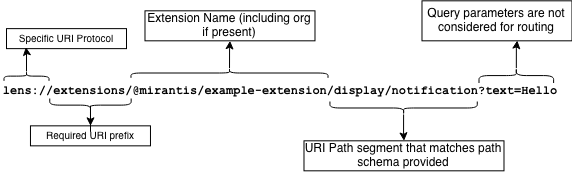
Once matched, the handler would be called with the following argument (note both "search" and "pathname" will always be defined):
{
  "search": {
    "text": "Hello"
  },
  "pathname": {
    "type": "notification"
  }
}
As the diagram above shows, the search (or query) params are not considered as part of the handler resolution.
If multiple pathSchema's match a given URI then the most specific handler will be called.
For example consider the following pathSchema's:
"/""/display""/display/:type""/show/:id"
The URI sub-path "/display" would be routed to #2 since it is an exact match.
On the other hand, the subpath "/display/notification" would be routed to #3.
The URI is routed to the most specific matching pathSchema.
This way the "/" (root) pathSchema acts as a sort of catch all or default route if no other route matches.
Cleaning Up
Currently there is not way to remove a protocol handler once it has been registered. Handlers will not be called if the extension is deactivated or uninstalled. This means that the handlers should be added (or re-added as the case may be) on every activation of an extension instance.